OpenClaw Review: Real-World Use on a $5 VPS
January is a strange month for trying new software. The holidays blur into routine, resolutions quietly die, and the tech world hums at half-speed. That's when I stumbled across OpenClaw, before the GitHub star explosion, before the Mac Mini aesthetic took over developer Twitter, and before every productivity newsletter stamped "Game-Changer" in the subject line.
I ran it for two weeks on a boring cloud server. I made mistakes, fixed them, found things that genuinely impressed me, and discovered corners where the hype doesn't quite hold up. What follows is that experience, not a summary of the README.
"Funny how we all seem to have the same weekend now… Mac Minis and Clawdbot."
— Circulating on developer Twitter, early 2026
Within days of going viral, the project crossed 100,000 GitHub stars. Developers were buying €700 desktop machines to run what runs fine on a €5 VPS. I watched the wave with that familiar indie-band-goes-mainstream feeling, except with more terminal screenshots and fewer guitar solos.
What OpenClaw Actually Is
Most people who write about OpenClaw have been using it for 48 hours. The elevator pitch sounds clean: connect your AI assistant to everything, let it run in the background, get things done. But that description papers over a core truth, OpenClaw is not a product. It is a framework you configure into a product.
At its core, OpenClaw is an orchestration layer. It sits on a server, listens for input from messaging platforms, routes that input to a language model of your choice, executes actions through pluggable "skills," and stores what it learns in plain Markdown files. Close your laptop and it keeps running. That's the detail most introductions miss: it's a service, not an app you launch.
The Four Moving Parts
Understanding the architecture saves you hours of confusion during setup. Everything in OpenClaw flows through four components working in sequence:
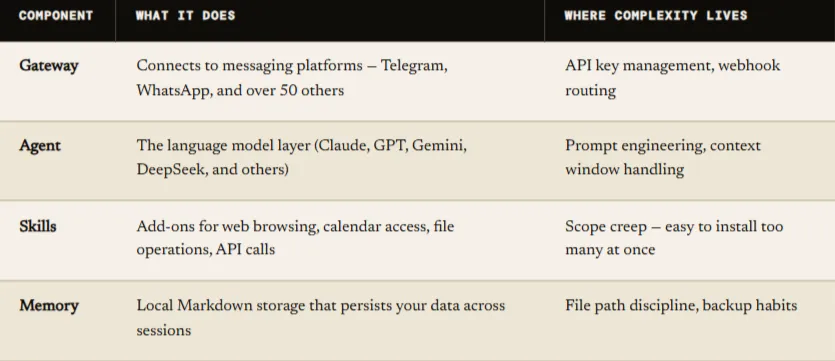
The beauty of this setup: the heavy compute, actual AI inference, happens remotely on your chosen model provider's servers. Your machine is just the conductor. That's why a €5 VPS with 2 vCPUs and 4 GB of RAM handles it without strain.
Why OpenClaw Is Not Claude Code
This confusion shows up constantly in comment sections. Claude Code is a focused developer tool — a hammer you grab when you need it, then put down. OpenClaw is a hammer that walks up to you and asks what needs fixing.
Claude Code is Anthropic's own product, designed for developer workflows, living in your terminal session. OpenClaw was built independently by developer Peter Steinberger, drawing inspiration from Claude Code's modular skill concept but extending it into something that runs continuously, connects to your broader life, and works while you sleep. They can run side by side without conflict, serving completely different purposes.
OpenClaw also isn't vendor-locked. The agent layer supports Claude, GPT-4o, Gemini, DeepSeek, and others. You route different tasks to different models depending on complexity and cost. For most conversational work, a lighter model handles things well. For complex reasoning, you reach for something heavier. OpenClaw makes that flexibility relatively painless to configure.
Quick distinction
Claude Code = a dev tool you invoke when needed. OpenClaw = an ambient assistant you deploy and leave running. Both have their place; neither replaces the other.
The Mac Mini Is Overkill. Full Stop.
This deserves its own section because the Mac Mini aesthetic went genuinely viral in ways that cost real people real money. The images are seductive, a gleaming compact machine on a clean desk, terminal open, assistant running. It looks like the future of personal computing. It is also completely unnecessary hardware for this use case.
"Please don't buy a Mac Mini — sponsor one of the OpenClaw developers instead. You can run this on AWS free tier."
— Peter Steinberger, OpenClaw creator
The project's own creator publicly asked people to stop buying hardware. The official account made the point even more directly: your existing MacBook can serve as a connected node. A fresh Mac Mini buys you nothing a €5 cloud server doesn't already provide, except a monthly electricity cost and a hardware failure risk that a managed VPS simply doesn't carry.
What My Actual Setup Looks Like
Two virtual CPUs. Four gigabytes of RAM. A 40-gigabyte SSD. After two weeks of continuous use — Telegram integration, Whoop health data pulls, sports alerts, file management, and daily summaries — I never once hit a resource ceiling. CPU usage hovers around 3–8% during active requests and drops to near zero otherwise.
There's also a practical safety argument for cloud deployment. If a misconfigured skill triggers an unintended file deletion and in early experimentation, unexpected things happen, it affects only your isolated VPS, not your personal machine. That's digital hygiene, not paranoia.
Before you buy anything
Spin up a €5 VPS on Hetzner, DigitalOcean, or your preferred provider. Run OpenClaw for two weeks. Only consider local hardware if you have a specific, justified reason — most people never find one.
VPS Setup: What the Docs Don't Emphasize Enough
The official documentation covers the steps. Experience fills in the gaps. Here's what the process actually involves, with the parts that tripped me up flagged clearly.
Before You Touch the Server
Before SSH-ing into anything, have these ready: your chosen model provider's API key, a Telegram account if that's your gateway, and about three hours for a first-time setup including the inevitable troubleshooting detours. The documentation estimates less time, but documentation is written by people who already know where the sharp edges are.
# Step 1: Update and harden SSH access
apt update && apt upgrade -y
adduser openclaw && usermod -aG sudo openclaw
# Step 2: Install Node.js LTS
curl -fsSL https://deb.nodesource.com/setup_20.x | bash
-apt install -y nodejs
# Step 3: Clone and initialize
git clone https://github.com/openclaw/openclaw
cd openclaw && npm install && npm run setup
The setup wizard handles most configuration interactively. The two places people consistently get stuck: gateway webhook configuration (your VPS needs an open port and a reachable domain or IP), and first skill activation (read each skill's own README before enabling it — they vary significantly in what permissions they need and what they can touch).
The Payoff Moment
When everything connects, there's a specific feeling you don't get from most software. You send a message on Telegram, and something responds, not with a canned reply, but with context from yesterday's conversation, information pulled from a calendar or health API, memory of what you said you'd do. It's not magic. But it's closer to magic than most software gets.
The Eight Mistakes I Made (So You Don’t Have To)
These aren't hypothetical. Each one cost me time, a restart, or a confused hour staring at logs late at night.
5 Use Cases That Genuinely Earned Their Place
There's a category of OpenClaw demos that impresses on video but fades in real use, elaborate multi-step chains that work once and then require constant babysitting. These five are not those. These are things I used every day for two weeks and continue using now.
Morning Health Summaries via Whoop Integration
Pulling recovery score, HRV, sleep data, and daily strain, formatted into a single morning briefing, sounds minor until you've had it for a week and then don't. No app-switching, no unlocking anything. One message, all the context.
Conversational Workout Scheduling That Adapts
This is where the memory layer earns its keep. The assistant remembers you agreed to train tomorrow, nudges you when tomorrow becomes today, and adjusts gracefully when you negotiate. The conversational quality here is surprisingly human in feel.
Automated Football Match Tracking with Custom Alerts
Pre-match summaries, live score pings for specific teams, post-match digests formatted the way you actually want them, not the way an app decided you should. The customization is genuinely better than any sports app I've used.
Contextual Task Reminders and File Management
Reminders that see your schedule, your recent conversations, and your stated priorities feel qualitatively different from a calendar ping. File management through natural language saves more time than you expect once properly tuned.
"Mentor Mode" — Pattern Recognition Across Time
The sleeper feature. Tell the assistant about decisions you're making, habits you're building. Over weeks, it accumulates enough context to reflect patterns back at you, what you said you'd do versus what you actually did. Part journal, part accountability partner. It only works with time invested.
What Doesn't Work as Well as the Demos Suggest
Complex multi-tool chains are brittle in ways showcase videos don't reveal. When four skills need to coordinate on a single task, failure modes multiply. Calendar data conflicts with health data, which conflicts with a web search result and suddenly you're debugging skill interactions instead of getting work done.
Cold-start behavior is also genuinely underwhelming. Without accumulated memory, OpenClaw feels like any other chatbot. The quality is proportional to the investment you've made building context. If you want instant value from day one, calibrate your expectations for the first week.
Final Verdict
Two weeks is enough time to see past the hype and past the early frustration to arrive at whatever truth lives in the middle. OpenClaw lives in that middle: genuinely useful, impressively capable once properly configured, and more demanding of patience and setup time than most viral threads let on.
For €5 a month and a few focused hours, you can run a self-hosted assistant that remembers your habits, integrates into your daily life, and keeps working when your laptop is closed. That is a real, working thing, not the sci-fi version, but a functional, evolving one. In 2026, that's more than most productivity software can honestly claim.